Usage Logs
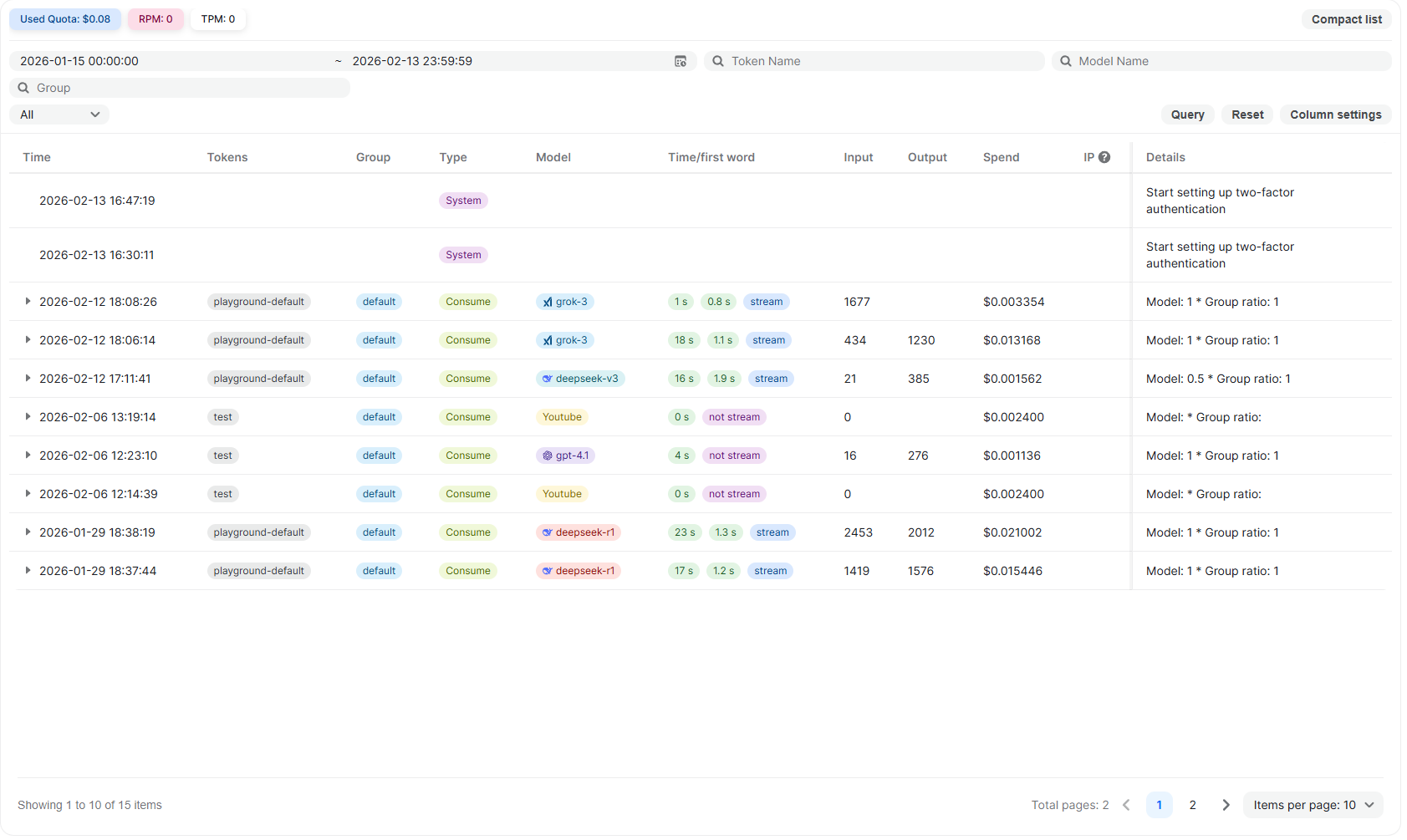
The Usage Logs page provides a complete history of activity associated with your account. It records API requests, token consumption, billing details, and important system-level actions, allowing you to monitor usage, verify costs, and audit account events in one place.
This page is useful for:
- Tracking API consumption and spend
- Reviewing token usage per request
- Monitoring request performance
- Auditing activity across groups or API keys
- Investigating unexpected charges or system actions
What Is Recorded
The Usage Logs include both API activity and key platform events.
API Requests
All requests made through:
- API keys
- Playground
- LLM inference APIs
- Per-call APIs (Search, Financial, YouTube, Scholar, Twitter, and others)
For each request, the log captures usage, performance, and billing information.
System & Account Events
Important account-level actions are also recorded. For example:
- Enabling two-factor authentication
- Security-related configuration changes
These entries appear as system events and are included for auditing purposes. They typically do not incur usage charges.
Overview Metrics
At the top of the page, summary metrics are displayed for the selected time range.
Used Quota
Shows the total quota consumed during the selected period.
RPM (Requests per Minute)
Indicates the rate of incoming requests.
TPM (Tokens per Minute)
Indicates the rate of token consumption.
These metrics help identify traffic spikes and overall usage patterns.
Filtering and Search
Usage logs can be filtered to narrow down results.
Available filters include:
- Date and time range
- Group
- Token Name
- Model Name
Click Query to apply filters and Reset to clear them.
Column visibility can be adjusted using Column settings.
Log Table Columns
Each row in the table represents a single event, either an API request or a system action.
Time
The timestamp when the event occurred.
Tokens
The API key used for the request. This field may be empty for system events.
Group
The workspace group associated with the API key.
Type
Indicates the request type.
For example:
- Consume – A standard API request consuming tokens
- System – an account or platform-level action
Model
The model used to process the request (for LLM calls).
Time / First Word
Performance details for supported API requests, including:
- Total request duration
- Time to first response token
- Whether the response was streamed
Input / Output
Number of input and output tokens consumed (for LLM requests).
Spend
The cost associated with the event:
- Token-based cost for LLM requests
- Fixed per-call cost for per-call APIs
- Typically no cost for system events
IP
The source IP address associated with the request, if available.
Only when the user sets IP recording, the IP recording of request and error type logs will be performed
Details
Additional information, such as applied pricing ratios or a description of the system event.
Viewing Log Details
Clicking a log entry expands a detailed breakdown.
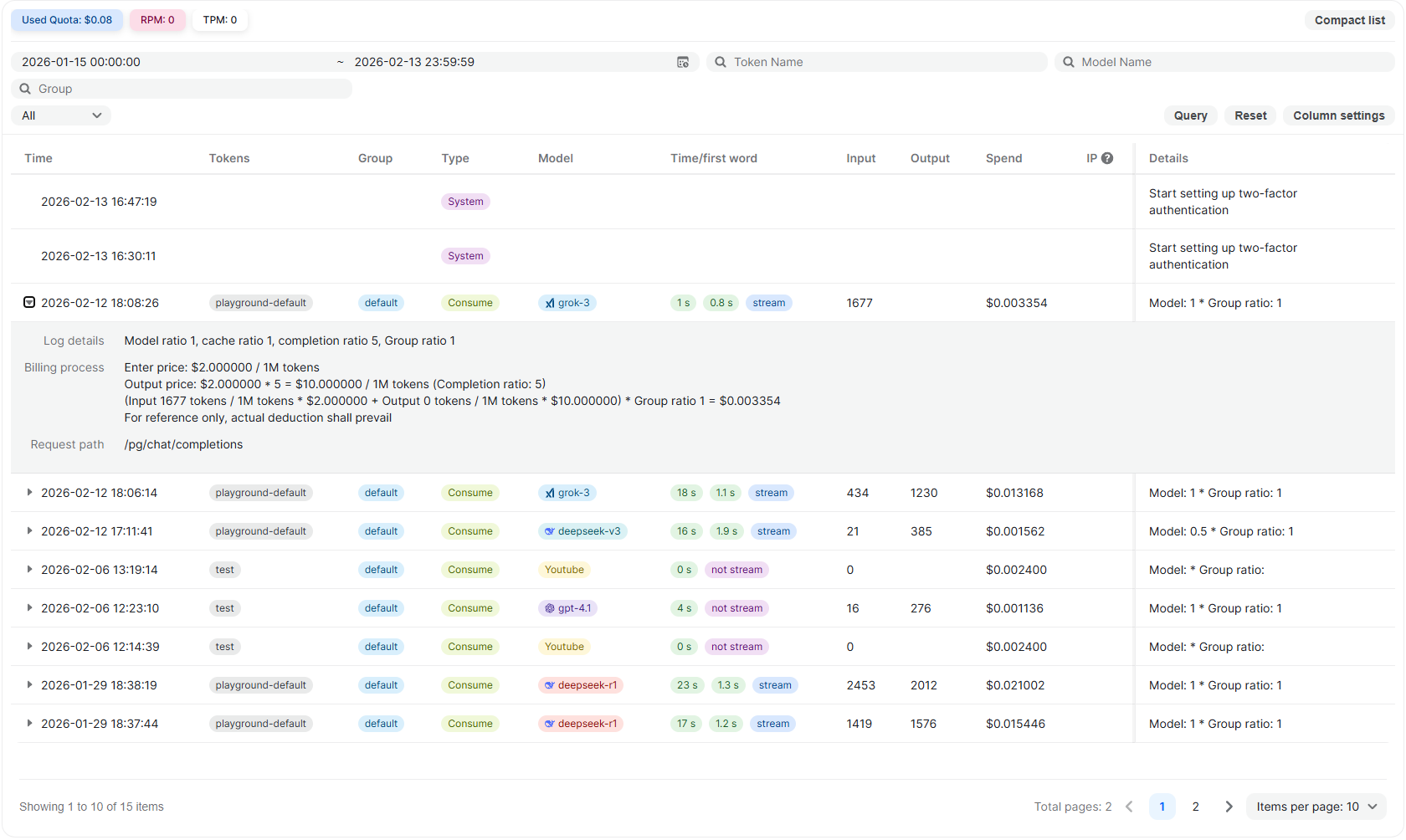
The expanded view includes:
Model Ratio and Cache Ratio
Displays model-specific billing multipliers applied to the request.
Example fields may include:
- Model ratio
- Cache ratio
- Completion ratio
- Group ratio
Billing Process
The billing breakdown shows how cost is calculated.
This includes:
- Input token price per 1M tokens
- Output token price per 1M tokens
- Multipliers applied
- Final calculated spend
The detailed formula is shown for transparency. Actual account deduction reflects the final calculated amount.
Request Path
Displays the internal API route used to process the request.
Example: /pg/chat/completions
This helps identify which endpoint was used.
This breakdown provides full transparency into how the final cost was calculated.
For system events, the expanded view describes the action performed.
How Billing Is Reflected
Usage costs are calculated based on:
- Token consumption (for LLM APIs)
- Fixed per-call pricing (for non-LLM APIs)
- Applicable model or group pricing rules
The Usage Logs show the calculated cost per event. The actual account balance deduction reflects the final computed amount.
Practical Use Cases
The Usage Logs page is helpful for:
-
Verifying token consumption per request
-
Tracking which models are being used
-
Auditing cost distribution across groups
-
Debugging unexpected billing behavior
-
Reviewing request latency and streaming performance
Notes
-
All Playground activity appears in Usage Logs.
-
All API key requests appear in Usage Logs.
-
System-level actions are recorded for audit visibility.
-
Costs shown in the log are deducted from the account balance where applicable.
Updated 14 days ago