
API Keys
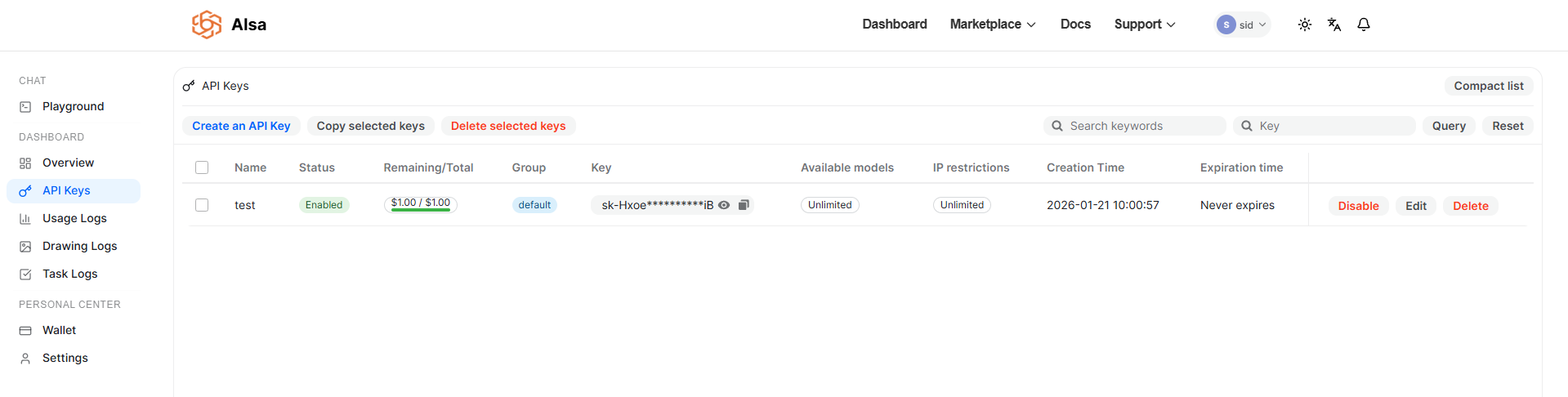
The API Keys page lets you create, manage, and control access to AISA APIs. API keys are required to authenticate requests from your applications and services.
From this page, you can generate new keys, configure limits and restrictions, monitor usage, and revoke access when needed.
Creating an API Key
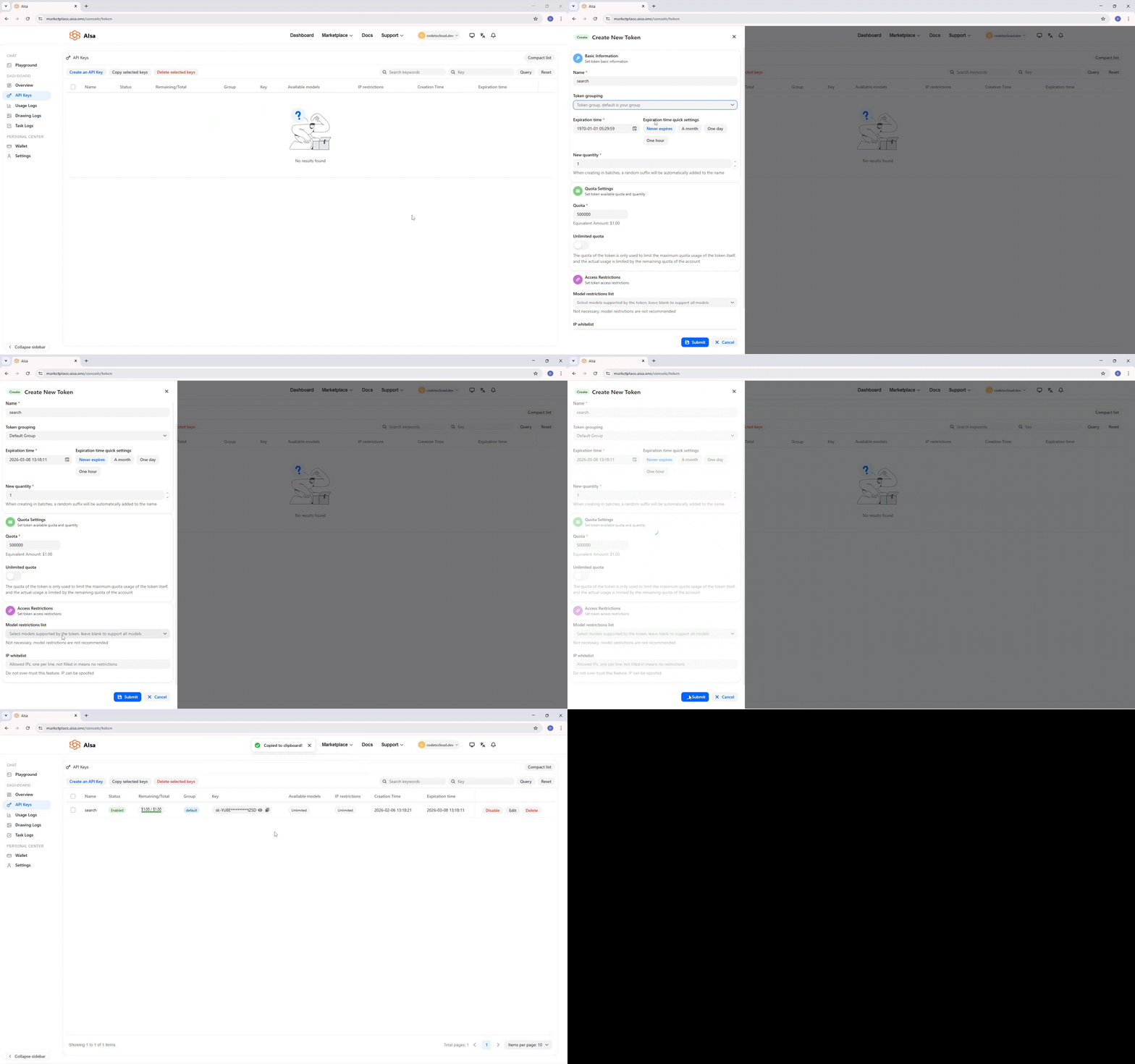
To create a new API key:
- Click Create an API Key
- Provide a name for the key
- Configure optional settings such as expiration, quota, and restrictions
- Submit to generate the key
Once created, the key will appear in the API keys list.
API Key List
The main table displays all API keys associated with your account.
Each row includes the following information:
Name
A human-readable label to help identify the purpose of the API key.
Status
Indicates whether the key is currently active.
- Enabled – The key can be used to make API requests
- Disabled – Requests using this key will be rejected
You can enable or disable a key at any time.
Remaining / Total Quota
Shows the remaining quota available to the key compared to its assigned limit.
- Quota is displayed as a usage balance
- Actual usage is also limited by the account’s remaining balance
Group
Indicates the workspace group the key belongs to.
Groups are used to organize usage, permissions, and billing across teams or projects. If no custom groups are configured, keys belong to the default group.
Key
Displays a masked version of the API key.
- Click the copy icon to copy the full key value
- Store API keys securely and avoid exposing them in client-side code
Available Models
Shows which models the key can access.
- Unlimited means the key can access all available models
- If model restrictions are applied, only selected models will be available
IP Restrictions
Indicates whether IP-based access restrictions are applied.
- Unlimited means requests can be made from any IP
- When configured, only requests from allowed IP addresses are accepted
IP-based restrictions should be used cautiously, as IP addresses can be spoofed in some environments.
Creation Time
The timestamp when the API key was created.
Expiration Time
Indicates when the key will expire.
- Keys can be configured to expire at a specific time
- This field shows Never expires if no expiration is set
Actions
Each key supports the following actions:
- Edit – Update key settings
- Disable – Temporarily deactivate the key
- Delete – Permanently revoke the key
Editing an API Key
Click Edit to update an existing API key’s configuration.
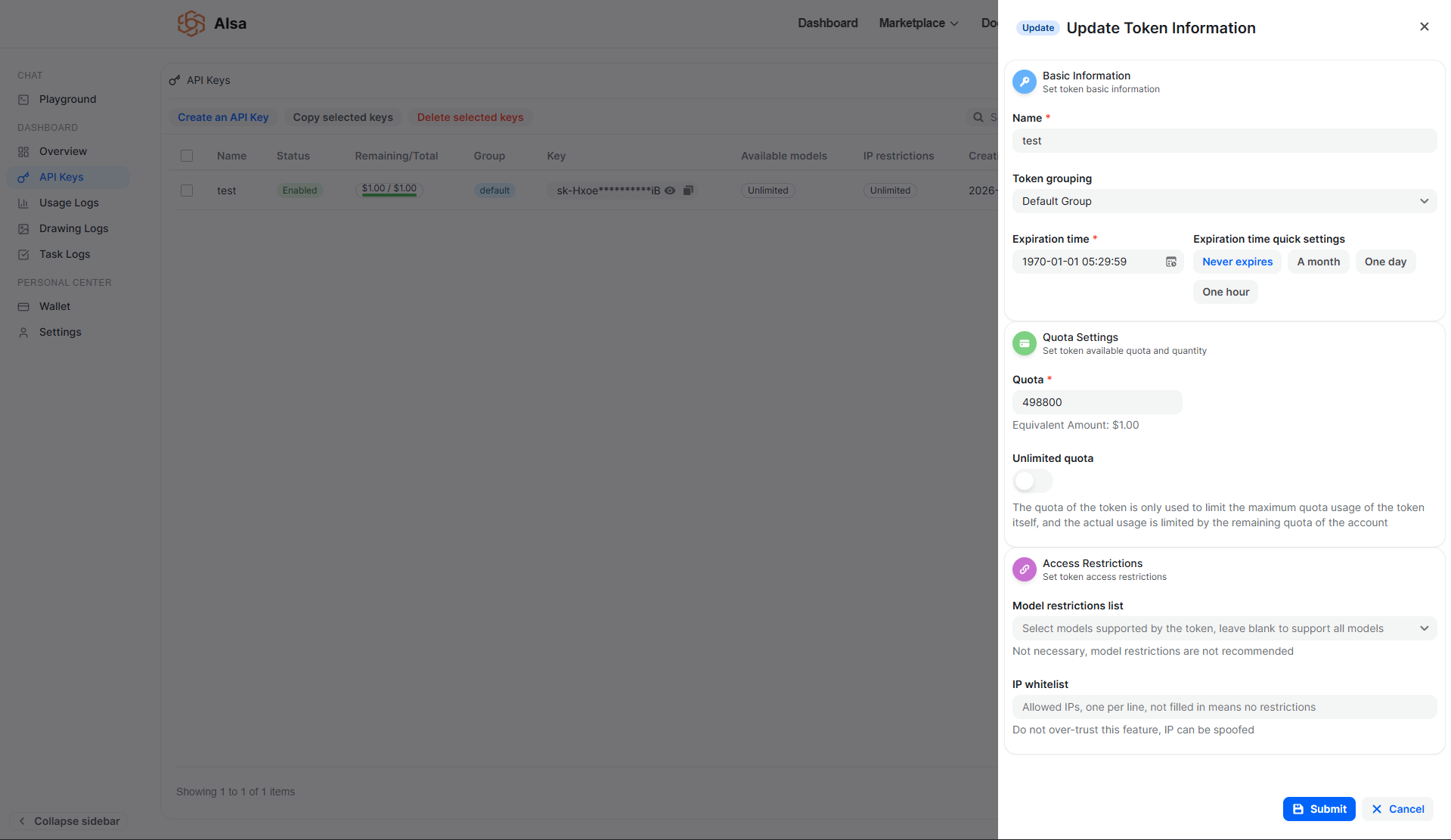
The edit panel includes the following sections:
Basic Information
Name
Update the display name of the API key.
Token Grouping
Assign the key to a specific workspace group.
Expiration Time
Set when the key should expire.
Quick options are available:
- Never expires
- One month
- One day
- One hour
Quota Settings
Quota
Defines the maximum quota that can be consumed by this API key.
- Quota is used to limit usage for the key itself
- Actual usage is also constrained by the account’s remaining balance
An equivalent currency amount is shown for reference.
Unlimited Quota
When enabled, the key is not restricted by a per-key quota limit.
Access Restrictions
Model Restrictions
Limit which models the API key can access.
- Leave blank to allow access to all supported models
- Model restrictions are optional and not required in most cases
IP Whitelist
Restrict API access to specific IP addresses.
- Enter one IP address per line
- Leaving this field empty means no IP restrictions are applied
Managing Multiple Keys
You can manage multiple API keys from this page:
- Select multiple keys to copy or delete in bulk
- Use search and filter options to locate keys by name or attributes
- Organize keys using groups for clearer usage tracking
Best Practices
- Create separate API keys for different applications or environments
- Rotate keys periodically
- Disable or delete unused keys
- Avoid embedding API keys directly in frontend code or public repositories
Usage and Billing
All requests made using API keys count toward usage and billing based on the account’s pricing and remaining balance.
Quota limits applied at the key level are enforced independently from the account’s total quota.
Updated 22 days ago